bdaFinale Judging A
NEW to Luca Memorial ? ➡️ Register at http://lucamemorial.org/register
If you are already registered, please log in using your email.
Password successfully changed
An email was sent to reset password
NEW to Luca Memorial ? ➡️ Register at http://lucamemorial.org/register
If you are already registered, please log in using your email.
Password successfully changed
An email was sent to reset password
Log out: click here
Jury PRESELECTION INSTRUCTIONS & TUTORIAL
here
Log out: click here
QUICK-START GUIDE
English
💡 FASTEST METHOD: Recommended for completing your PRESELECTION task efficiently:
Judging with a desktop computer and a mouse is easier and faster than using a mobile phone.
Log in to the platform and refer to the attached PDF, where reference numbers indicate the steps and where to click.
[A] View Caving Photos:
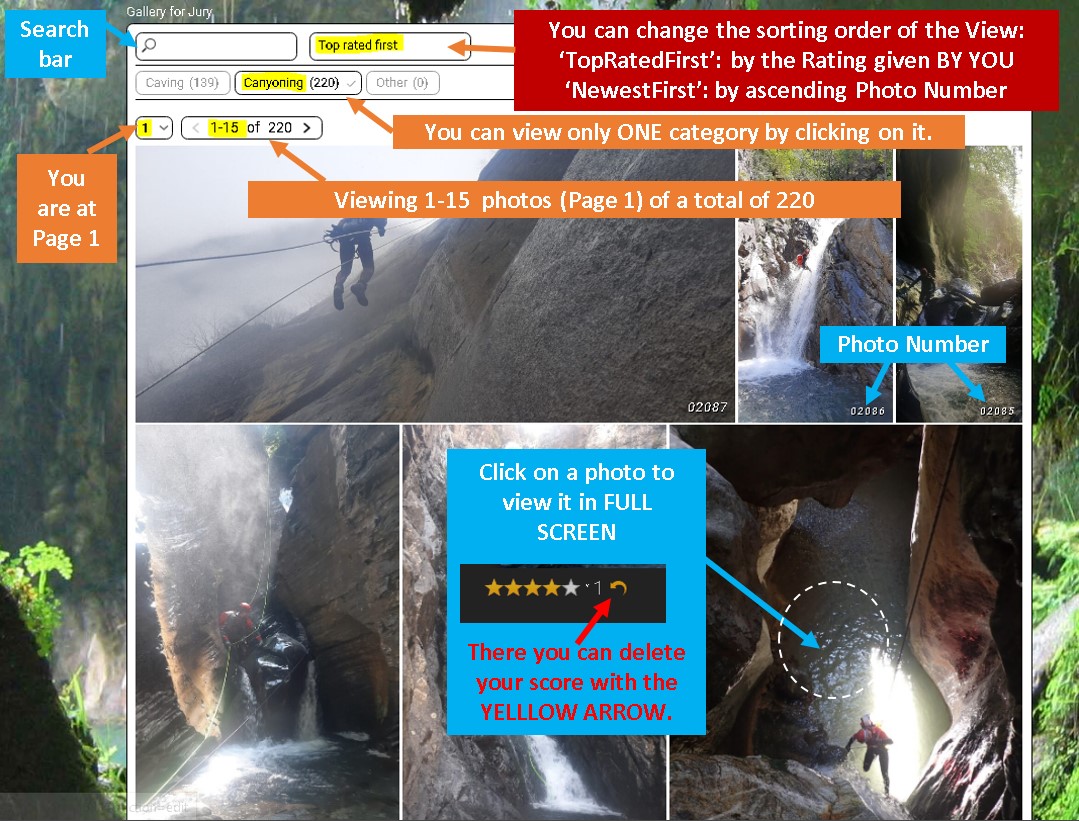
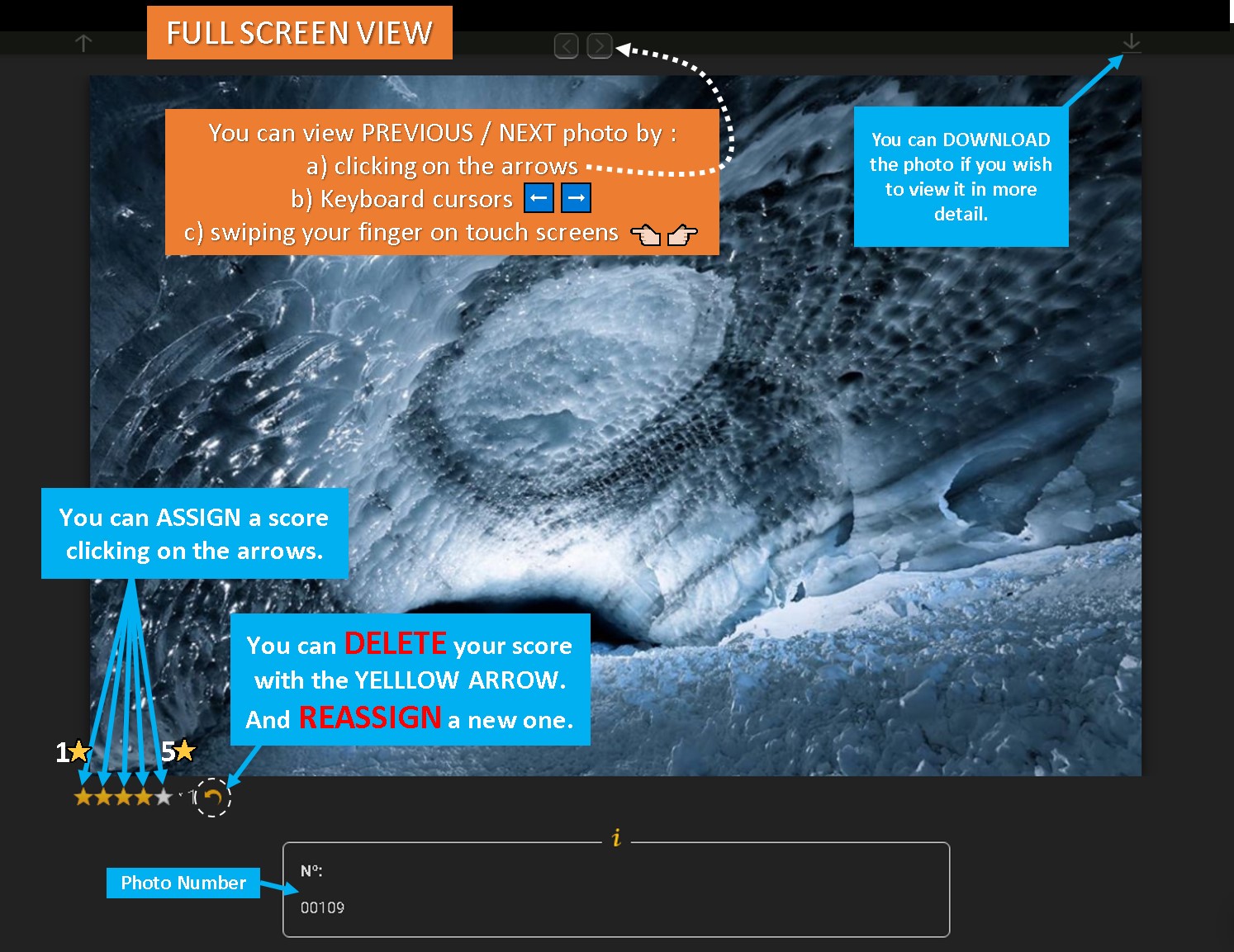
▪️ Select the ‘Caving’ category (1), and click the first photo (2) to enter full-screen mode.
▪️ Briefly view each photo. (3) If excellent, assign a 1-star score. Use the (4) keyboard right arrow key (or swipe/‘>’ icon) to navigate to next photo.
▪️ Continue scoring photos that are better than the previously scored ones with 1, 2, or 3 stars as needed. The gallery will load the next page automatically until no more photos remain (no ‘>’ icon above photo).
[B] Select Best Caving Photos:
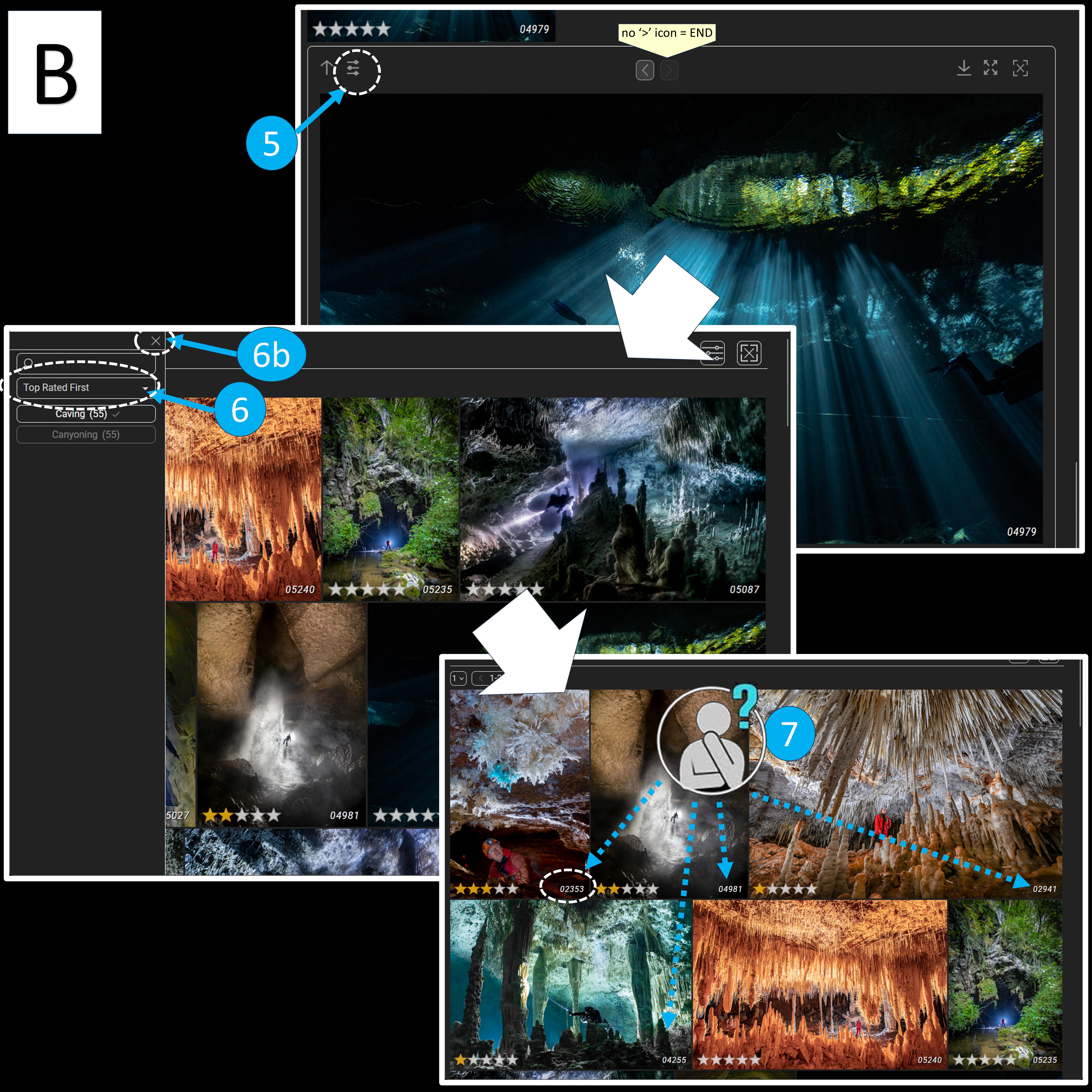
▪️ Click on (5) setting icon and change the (6) view to ‘TopRatedFirst’ and (6b) close settings
▪️ Scroll up to see your ranked scored photos. (7) Choose your BEST 2 CAVING photos.
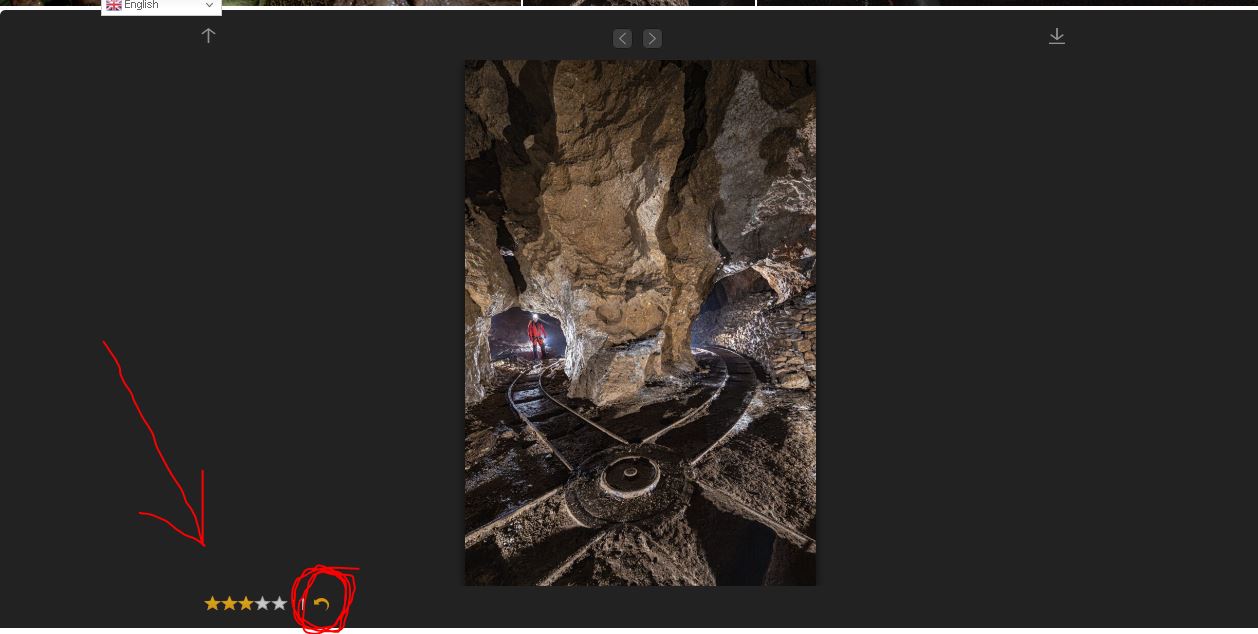
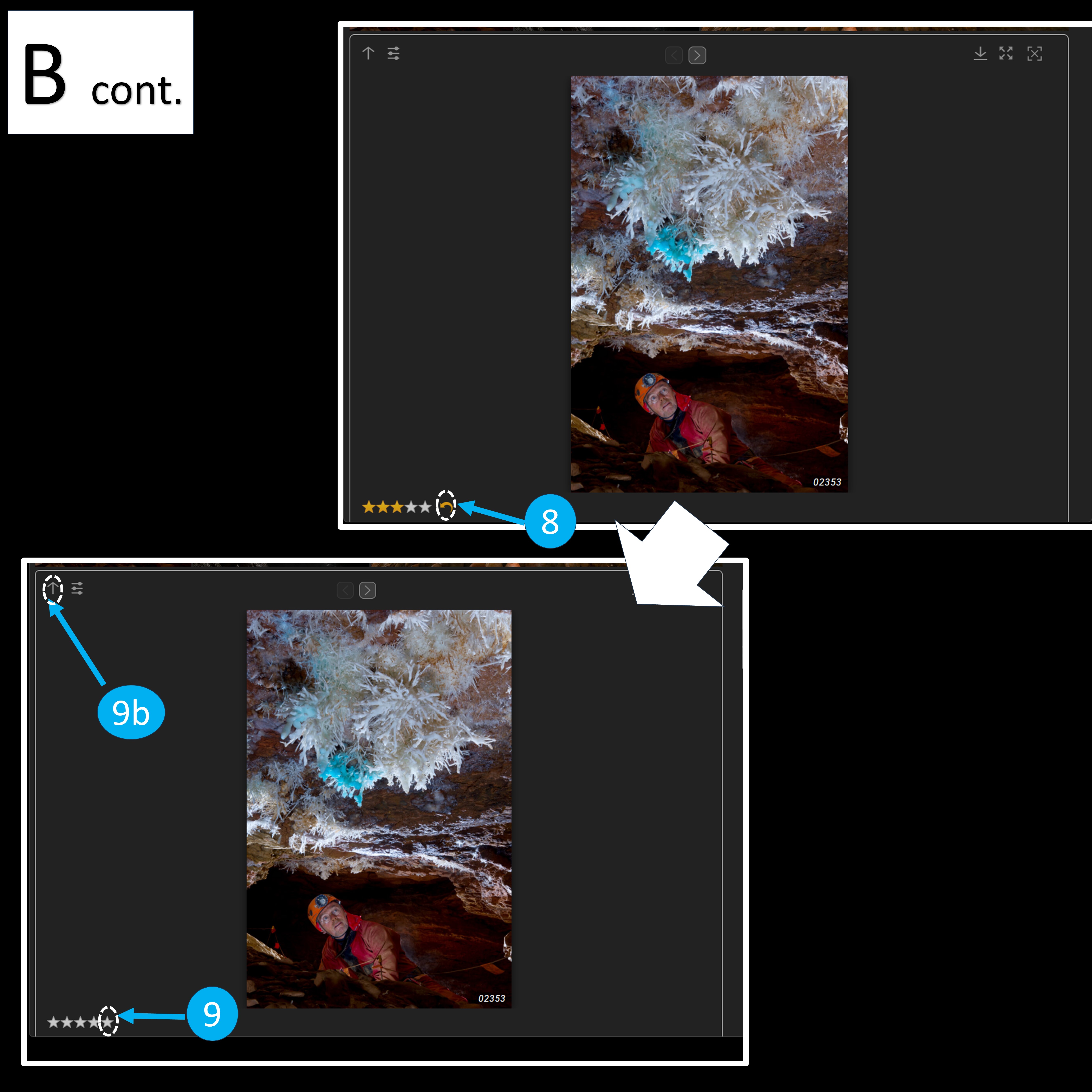
▪️ Click on your first chosen photo, remove their previous scores with (8) the yellow arrow, and assign them (9) 5 stars. Go back to the gallery (9b) clicking ⬆, to rescore your second chosen photo.
[C] Switch to Canyoning Photos:
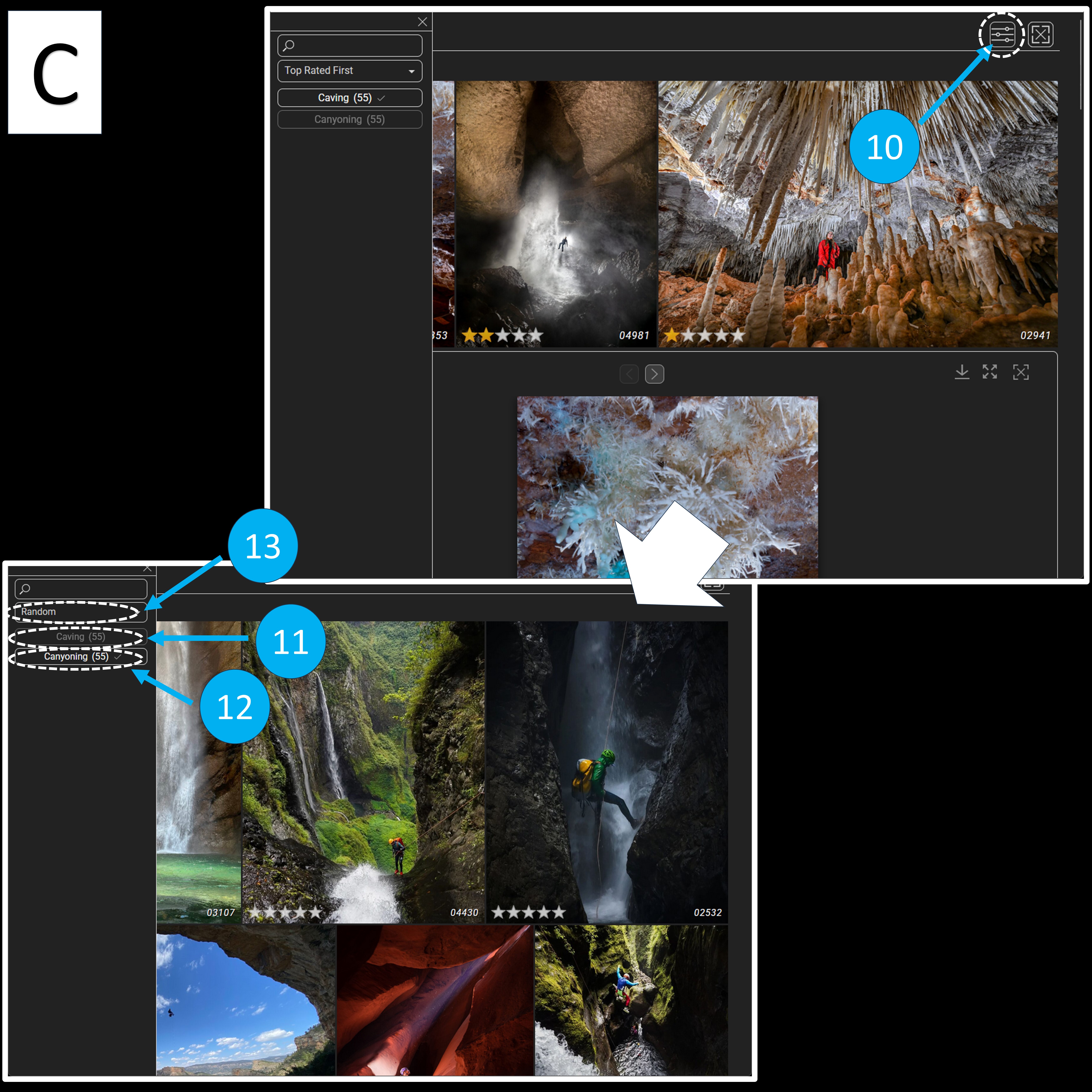
▪️ Click on (10) settings, deselect ‘Caving’ (11) and select ‘Canyoning’ (12) [selected categories are in white, deselected in grey].
▪️ Set the view to (13) ‘Random’.
▪️ Repeat the process to evaluate CANYONING photos and select the BEST 2 CANYONING photos, assigning them 5 stars.
JUDGING GALLERY
FINALE 2025
JUDGING GALLERY IS OPEN FOR PRESELECTION
EXTENDED TIME
JUDGING GALLERY IS NOT OPEN YET
CLOSING 25 JANUARY 13:00 CET
PRESELECTION JUDGING IS CLOSED
Please go to the JUDGING link we have provided you in our LAST EMAIL
Only for demonstration. This is NOT the FINALE 2024 gallery.
REMEMBER:
You may recognize or know the author and locations of some photos , please judge as objectively as possible , strictly focusing on the scene and not the authors or locations.
RECUERDA:
Es posible que reconozcas o conozcas al autor y las ubicaciones de algunas fotos, juzgue de la manera más objetiva posible, centrándose estrictamente en la escena y no en los autores o las ubicaciones.
- Use a Computer and log in the judging gallery. Click on the first photo, you will see it full screen. Only if you think is very very good give it a 1⭐.
Click on the Right Arrow Key “->” on your KEYBOARD, you will see next picture at full screen. - Go through all photos and rate 1⭐to all photos that you think are very good.
- Change the sorting to “Top rated first”. Review the photos you rated with 1⭐and increase the rating for better photos to 2⭐( better photos)or 3⭐(much better photos)
- To refresh the view: change the sorting to ‘Newest first’ and then again to ‘Top rated first’. Review all your 3⭐ rated photos and give them 4 ⭐(best photos) or 5 ⭐(top best photos)
- Refresh the view, and check you have maximum 5 photos with the same score as well as have 12-15 rated photos, minimum 5 caving and minimum 5 canyoning. Upgrade, downgrade or reset ratings to comply these criteria.
- If you have >15 rated photos, we will ignore your lowest rated till comply with the limit (i.e. ignore all 1⭐ photos).
👉🏻 You can watch the detailed VIDEO TUTORIAL (3′) below if you want to know more about the judges gallery
▫️ ENG https://lucamemorial.org/wp-content/uploads/2021/12/fben-jury-tutorial-video2.mp4
▫️ ESP https://lucamemorial.org/wp-content/uploads/2021/12/fbes-jury-tutorial-video2.mp4
▫️ ITA https://lucamemorial.org/wp-content/uploads/2021/12/fbit-jury-tutorial-video2.mp4
-
👉🏻👉🏻👉🏻If your ratings do not comply our rules, we will inform you, and you can choose to:
- A)YOU decide the corrections, and indicate us which photos to downgrade or upgrade (or you can make yourself the corrections)
- B) WE give priority to photos voted by other Judges and downgrade/upgrade accordingly to what other judges have voted:
In example: If you have 4📷 x 5⭐, 7📷 x 4⭐, and 4📷 x 3⭐….
… we will downgrade to 3⭐ the one photo you rated 4⭐ that has been less voted also by other judges. Since we can not downgrade more photos(you will have 5📷 with 3⭐), we will upgrade to 5⭐the one photo you rated 4⭐ that has been most voted also by other judges. So that no more than 5 photos have the same scores.
In case of lack response in 48h, option B) will be applied, noting down the changes.
We will inform you in any way about the changes and final table of your votes per email.
Final ranking and all votes and changes prioritized by us will be available to judges after announcement of Winners.
The photo contest is over
You have already voted for this picture
You have already used all your votes
Loading GALLERY...please wait.
Meanwhile, you can test the DEMO
Mientras tanto, puedes probar la DEMO
Nel frattempo, puoi testare la DEMO
En attendant, vous pouvez tester la DEMO
Enquanto isso, você pode testar o DEMO